
Best AI Logo Maker in 2026: 8 Tools Compared on Price, Quality and Commercial Safety
Quick answer: what is the best AI logo maker in 2026?
For most new businesses, Looka is the strongest all-round pick in 2026: it walks you through a full brand identity, not just a logo file. Brandmark is better if you want to pay once and care most about typography, Design.com is the best-value pick if you want a free tier and low-cost matching assets, Canva or Wix suit people already in those ecosystems, and Tailor Brands suits anyone who wants logo and business setup bundled together.
No single tool wins for everyone, so this guide compares eight of them on the things that actually decide whether a logo is worth using: price, file formats, AI editing, exclusivity, brand kit depth and legal safety.
Quick picks at a glance
| Your situation | Best pick | Why |
|---|---|---|
| Best overall and best guided brand kit | Looka | Step-by-step flow that ends in colors, fonts, templates and social assets |
| Best pay-once option | Brandmark | One-time pricing, strong typography-led logos |
| Best value with a free tier | Design.com | Free tier, low entry price, vector files, AI chat editing, 50+ branding tools |
| Best for logo plus business setup | Tailor Brands | Bundles branding with LLC and website services |
| Best if you already use Canva | Canva | Logo sits next to your social, slides and docs |
| Best if you’re building a Wix site | Wix Logo Maker | Logo, site and domain in one place |
| Best for print collateral | Vistaprint | Logo flows straight into cards, signs and merch |
| Best for Adobe users | Adobe Express | Clean vector output, Creative Cloud workflow |
Comparison table: price, files and features
Prices change often. The figures below come from public pricing pages and recent comparison sites as of late October 2026. Always confirm on the vendor’s site before buying.
| Tool | Pricing model | Entry price (approx.) | Free option | Vector files | Standout |
|---|---|---|---|---|---|
| Looka | One-time packages plus subscription | One-time packages roughly $35 to $72 after a September 2026 rise; Brand Kit $96/yr | Design free, pay to download | Premium package and up | Guided brand kit |
| Brandmark | One-time | $25 / $65 / $175 | Preview only | Higher tiers | Typography-forward, pay once |
| Design.com | Free tier plus subscription | From $3/mo billed annually; $9/mo billed monthly | Yes (company-reported) | SVG, EPS, PDF | Large template library, AI chat editing |
| Tailor Brands | Subscription | Roughly $10 to $50/mo on monthly billing | No | Paid plans | Logo plus business bundle |
| Canva | Freemium | Free; Pro $15/mo or $120/yr | Yes | SVG on Pro | Huge all-round design suite |
| Wix Logo Maker | One-time or site plan | $20 or $45 one-time; site plans from about $17/mo | Preview only | In the $45 package | Pairs with Wix websites |
| Adobe Express | Freemium | Premium $9.99/mo or $99.99/yr | Yes | Strong | Adobe ecosystem |
| Vistaprint | One-time | $10 PNG; $30 full file pack | Preview only | Full pack | Print integration |
How we evaluated these tools
We compared tools on seven criteria, weighted toward what small businesses actually need:
- Logo quality and originality: is the output distinctive or generic?
- AI capability: can you edit with plain-language prompts, or only pick from presets?
- File formats: vector (SVG, EPS, PDF) for print and scale, raster (PNG, JPG) for web.
- Pricing clarity: what you pay on day one and in year one.
- Brand kit depth: colors, fonts, templates, social assets.
- Exclusivity and licensing: can a competitor end up with the same base design?
- Ease of use: can a non-designer finish in minutes?
This guide draws on vendor pricing pages, independent price trackers and published reviews. It doesn’t invent star ratings, because a made-up score only looks scientific. Where a claim comes from a vendor, we say so. The best way to confirm any pick is to run the same three-brand test yourself, which we explain in the next section.
What is an AI logo maker, and how does it work?
An AI logo maker turns a few inputs, usually your business name, industry and style preferences, into a set of logo options you can customize and download. In practice there are two approaches:
- Template-plus-AI: The tool searches a large library of designer-made templates and adapts them to your name and keywords. Results tend to be polished and balanced, and some platforms make templates exclusive. Design.com and Canva lean this way.
- Generative AI: The tool builds new marks from prompts. This can feel more original but is less predictable, and quality varies by brief. Looka and Brandmark combine generation with layout rules and customization.
Most tools now add chat-based editing, where you type something like “make the icon simpler” and the AI revises the design. This is the biggest usability change in logo makers since the drag-and-drop editor.
The 8 best AI logo makers in 2026
1. Looka: best guided brand kit
Best for: People who want to be walked through the whole identity, not just the logo.
Looka generates many options from your name, industry and style choices, then builds a brand kit with palettes, fonts and templates. Pricing has moved around in 2026: price trackers recorded a lower top-tier subscription in February and then a rise in one-time logo packages in September. As of that report, the Basic package was about $35 and Premium about $72, with the Brand Kit subscription at about $96 a year. Confirm current pricing before you commit.
Strengths: Polished guided flow, large option set, brand kit and website tools.
Limitations: No permanent free download, and reviewers frequently mention confusion about one-time versus subscription pricing.
Verdict: A strong pick if you’ll actually use the brand kit. If you only need a logo file, cheaper options exist.
2. Brandmark: best one-time payment
Best for: Wordmarks and lettermarks where typography matters most, and buyers who hate subscriptions.
Brandmark sells one-time packages, commonly listed at $25 (Basic), $65 (Designer) and $175 (Enterprise). Comparison sites repeatedly praise its typography and note that it offers fewer starting concepts and less customization depth than some rivals. It reportedly added a conversational chat interface in 2026.
Strengths: Pay once, own the files, clean type-driven results.
Limitations: Weaker for illustrated or playful brands, and fewer initial concepts.
Verdict: The best fit if your brand is mostly your name, set well.
3. Design.com: best value with a free tier
Best for: Founders who want a logo plus a full set of matching assets on a small budget.
Design.com pairs an AI logo generator with a very large template library, and its AI editor lets you change a design by typing instructions. The company reports 400,000+ logo templates, 750+ fonts and downloads in SVG, EPS, PDF, PNG, JPG, GIF and MP4. Other reviewers cite higher template counts, so treat exact numbers as approximate. Paid plans start around $3 a month on annual billing (about $9 on monthly billing), and the company says its free tier includes a logo download plus a basic website, link-in-bio page and digital business card. One independent review reports a limit of five free AI generations or edits.
Strengths: Low entry price, vector exports, animated formats, 50+ branding tools that pick up your logo colors, optional extended license for exclusivity.
Limitations: Simplicity comes at the cost of fine control, so experienced designers may want more. Many of the strongest claims about it come from its own marketing, so run your own test.
Verdict: A strong all-in-one for budget-minded founders, and worth testing against Looka and Brandmark with the same brief.
4. Tailor Brands: best for logo plus business setup
Best for: Solo founders who want branding, website and business formation help in one subscription.
Tailor Brands is positioned as a business-in-a-box platform. Comparison sites list plans from roughly $10 to $50 a month on monthly billing, with lower effective prices on annual plans and LLC-formation bundles around $200 a year. Value depends on whether you’ll use the extras.
Strengths: Bundles logo with other launch tasks and a digital business card.
Limitations: Subscription only, and more expensive than logo-first tools if you just need a logo.
Verdict: Good for convenience, less good for pure logo value.
5. Canva: best for people already in Canva
Best for: Teams that make social posts, slides and documents in Canva every week.
Canva has a generous free plan and a Pro plan at $15 a month or $120 a year, which unlocks brand kits and SVG export. The catch is that its logo templates are not exclusive and its logo AI is lighter than dedicated tools, so your logo may resemble other Canva logos.
Strengths: Huge design suite, free tier, easy learning curve.
Limitations: Less distinctive logos, and vector export needs a paid plan.
Verdict: Convenient if you’re already there. Not the best choice if originality matters.
6. Wix Logo Maker: best with a Wix website
Best for: Anyone launching a site on Wix.
Wix lets you design and preview a logo free, then pay roughly $20 for a standard file or $45 for a fuller package including vectors, according to a May 2026 comparison. Site plans start around $17 a month. It is quick and tidy but narrower than logo-first platforms.
Strengths: Fast, clean results, tight website integration.
Limitations: Vector files cost extra, and branding tools outside Wix are limited.
Verdict: A sensible bundle if your website already lives on Wix.
7. Adobe Express: best for Adobe users
Best for: Designers and agencies already on Creative Cloud.
Adobe Express has a free plan and a Premium plan at $9.99 a month or $99.99 a year. Its vector quality and Adobe Fonts access are real strengths. Its logo-specific library and AI are thinner, so you’ll likely refine the output yourself.
Strengths: Excellent vector output, Adobe Fonts, Illustrator workflow.
Limitations: Smaller logo library and a steeper learning curve for newcomers.
Verdict: Best when logos are one part of a larger Adobe workflow.
8. Vistaprint: best for print-first small businesses
Best for: Local businesses that need cards, signs and merchandise fast.
Vistaprint reportedly charges about $10 for a PNG and $30 for the full file pack, with no subscription. The logo output is functional rather than distinctive, but the handoff to print products is smooth.
Strengths: One-time pricing, easy path from logo to print.
Limitations: Less distinctive designs and limited AI customization.
Verdict: Good for speed and print, weaker for brand personality.
How much will your logo really cost? Year-one comparison
Pricing models differ, so the cheapest sticker price isn’t always the cheapest year. Approximate first-year costs for a logo with usable files:
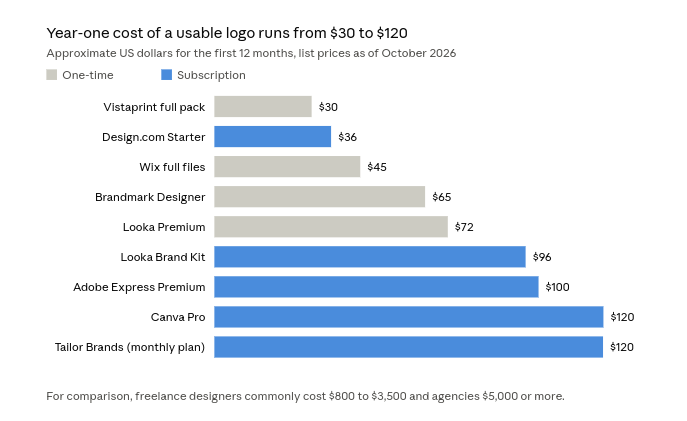
Design.com’s figure assumes the Starter plan on annual billing, Looka Premium reflects the post-September price, and Tailor Brands assumes its entry monthly plan for 12 months.
A useful rule: if you need only a logo file, a one-time option usually wins. If you’ll also use social templates, cards and a website, a subscription platform can cost less than buying those pieces separately.
Is an AI-generated logo safe to use commercially?
This is the most overlooked question in logo making, so here is the short version.
1. Get vector files. SVG, EPS and PDF files scale to any size without blurring, which you need for signage, embroidery and print. PNG and JPG files suit web and social. A transparent-background PNG is the one you’ll use most often.
2. Check the license. A standard license lets you use the logo commercially. An extended or exclusive license removes the base template from the public library so a competitor can’t start from the same design. Design.com advertises this option. Canva’s templates are not exclusive.
3. Understand AI and copyright. In the United States, the Copyright Office has taken the position that purely AI-generated material without enough human authorship generally can’t be registered for copyright. That’s one reason to edit and customize your logo rather than use the first output untouched. Rules differ by country, and this isn’t legal advice.
4. Search for trademark conflicts. Copyright and trademark are different. Before you commit, search your national trademark database and a general web and image search for lookalikes. Platforms may screen templates for originality, but a platform’s check is not a trademark clearance. If the logo is central to your brand, consult a trademark attorney.
How to choose the right AI logo maker in 5 questions
- Do you want to pay once or monthly? Pay once: Brandmark, Vistaprint, Wix or a Looka package. Monthly or annual: Design.com, Canva, Tailor Brands.
- Do you need more than a logo? If you want cards, social templates and a site, favor Design.com, Looka’s Brand Kit or Tailor Brands.
- Is exclusivity important? Choose a tool with an extended license, or customize heavily.
- Are you already in an ecosystem? Canva, Wix and Adobe Express reward existing users.
- Is your brand mostly a name? Try Brandmark first for type-led marks.
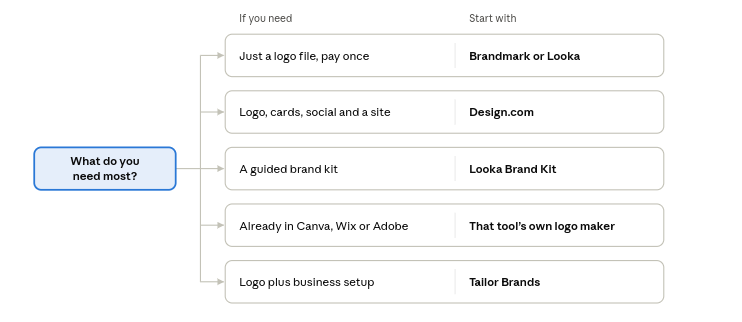
Match your main need to a row, then test the tool with the same brief you give its closest rival.
How to get a better logo from any AI tool
- Write a specific brief. Name, industry, audience and three style words (for example, “calm, modern, botanical”) beat a vague request.
- Run three prompts. Test each shortlisted tool with the same three brand briefs and compare. This is the fairest way to judge.
- Prefer simple. If the mark isn’t readable at 32 pixels, it won’t work as a favicon or app icon.
- Test in black and white. A strong logo holds up without color.
- Check it on real backgrounds. Light, dark and busy photo backgrounds expose weak designs.
- Edit, don’t just accept. Adjust spacing, fonts and colors so it becomes yours.
Common mistakes to avoid
- Paying for a logo before confirming you’ll get vector files.
- Assuming a subscription includes lifetime ownership of the files. Check what you keep if you cancel.
- Skipping the trademark search.
- Choosing a trendy style that will date quickly.
- Using a low-resolution PNG for print.
Frequently asked questions
What is the best AI logo maker?
For most new businesses, Looka is the strongest all-round pick in 2026 because it guides you from logo to full brand kit. Brandmark suits one-time buyers, Design.com offers the best value if you want a free tier and matching assets, and Canva or Wix suit existing users.
Is there a free AI logo maker?
Yes. Design.com and Canva both have free options, though free plans can limit AI use, file types or exclusivity. Several other tools let you design for free but charge to download.
How much does an AI logo cost?
Typically $25 to $120 for the first year with usable files, compared with commonly cited $800 to $3,500 for a freelancer and $5,000 or more for an agency.
Can I trademark an AI-generated logo?
Often yes, because trademark rights depend on use in commerce and distinctiveness rather than how the artwork was made, but rules vary. Copyright for purely AI-generated artwork is more limited in some countries. Speak to an attorney for your situation.
Which file formats do I need?
At minimum, a vector file (SVG, EPS or PDF) for print and scaling, plus PNG with a transparent background for web and social.
Are AI logos unique?
Not automatically. Template-based tools can give several customers the same base design unless you buy an exclusive or extended license. Customizing the design helps.
AI logo maker or a human designer?
Use an AI tool for speed and budget, especially at launch. Hire a designer when your logo needs to carry a lot of brand strategy, you need unique illustration, or you’re preparing for a major rebrand.
How long does it take?
Most people reach a usable draft in under ten minutes. Refining and testing it properly takes longer and is worth the time.
Final verdict
If you want one place to start, try Looka first, then test Brandmark and Design.com with the same brief and keep whichever logo you’d be proud to put on a storefront. Pick Brandmark if you want to pay once, Design.com if a free tier and low monthly cost matter most, Canva or Wix if convenience inside an existing tool matters, and Tailor Brands if business setup is part of the job.
Whichever you pick, insist on vector files, understand your license, and run a trademark search before you print anything.
1 thought on “Best AI Logo Maker in 2026: 8 Tools Compared on Price, Quality and Commercial Safety”