15 Best AI Branding Tools in 2026: Names, Logos, Visuals and Brand Voice Compared
Quick answer: what are the best AI branding tools in 2026?
For most new businesses, Looka is the best single AI branding tool in 2026, because it takes you from a logo to a full brand kit in one guided flow. But branding is several jobs, not one, so the strongest setups combine tools: Namelix for names, Looka, Brandmark or Design.com for identity, Canva for everyday assets, Midjourney or Recraft for original visuals, Jasper for brand voice, and Marq or brand.ai once a team needs guardrails.
If a logo is all you need, start with our guide to the best AI logo makers. This list covers everything around the logo.
Quick picks at a glance
| If you need to… | Start with | Why |
|---|---|---|
| Name your business | Namelix | Free, and it shows .com availability next to each name |
| Get a logo and brand kit fast | Looka | Guided flow that ends in colors, fonts and templates |
| Pay once for a type-led logo | Brandmark | One-time packages, strong typography |
| Start free with matching assets | Design.com | Free tier, low entry price, 50+ branding tools |
| Launch a business and brand together | Tailor Brands | Bundles branding with business setup services |
| Build a strategy-led identity | BrandingStudio.ai | Strategy, voice, visuals and guidelines in one workflow |
| Make everyday branded content | Canva | Brand kits and templates for social, slides and docs |
| Create original brand imagery | Midjourney | Strong image quality and style range |
| Get vector art in a locked style | Recraft | Native SVG and custom brand-style training |
| Write in a consistent voice | Jasper | Brand Voice trained on your own content |
| Keep a team on-brand | Marq | Locked templates and brand checking (vendor-reported) |
Comparison table: job, price and best use
Figures come from vendor pages, price trackers and recent comparison sites as of late October 2026. Where sources disagree, we show a range.
| Tool | Brand job | Pricing model | Entry price (approx.) | Best for |
|---|---|---|---|---|
| Namelix | Naming | Free names; logos via Brandmark | Free for names | Brandable name ideas |
| Looka | Identity, brand kit | One-time plus subscription | One-time packages roughly $35 to $72 after a September 2026 rise; Brand Kit $96/yr | Guided brand kit |
| Brandmark | Identity | One-time | $25 / $65 / $175 | Pay-once, type-led logos |
| Design.com | Identity, assets | Free tier plus subscription | From $3/mo billed annually | Budget all-in-one |
| Tailor Brands | Identity, business setup | Subscription | Roughly $4 to $50/mo depending on plan and billing | Launch bundle |
| Designs.ai | Identity, multi-asset | Subscription | Roughly $19 to $29/mo (sources differ) | Logo plus video and social |
| BrandingStudio.ai | Strategy, identity | Free start plus paid | Vendor blog lists a $237 one-time option | Strategy-led identity |
| Canva | Brand kit, content | Freemium | Free; Pro roughly $13 to $15/mo | Everyday content |
| Adobe Express | Brand kit, content | Freemium | Premium $9.99/mo or $99.99/yr | Adobe users |
| Midjourney | Visuals | Subscription | $10 / $30 / $60 / $120 per month | Original imagery |
| Recraft | Visuals, vector | Freemium | Paid roughly $10 to $25/mo (sources differ) | Vector art, locked styles |
| Jasper | Voice, copy | Subscription | Roughly $39 to $69 per seat per month | Brand voice at volume |
| Marq | Governance | Quote-based | Check vendor | Distributed teams |
| brand.ai | Governance | Quote-based | Contact for quote | Enterprises |
| Brandfetch | Brand data | Free plus API plans | Free plan; paid listed at $129/mo | Developers, brand research |
The brand stack: six jobs AI can do for your brand
Branding is a chain of decisions, and AI now helps at every link:
- Naming: generating short, brandable names and checking domains.
- Identity: logos, colors and typography.
- Brand kit and everyday design: templates that reuse your identity across social posts, slides and documents.
- Visuals: original imagery, illustrations and vector art in a consistent style.
- Voice: copy that sounds like you, not like generic AI.
- Guidelines and governance: rules and checks that keep teams and AI assistants on-brand.
Most tools below do one or two of these jobs well. None does all six equally, which is why this guide groups them by job.
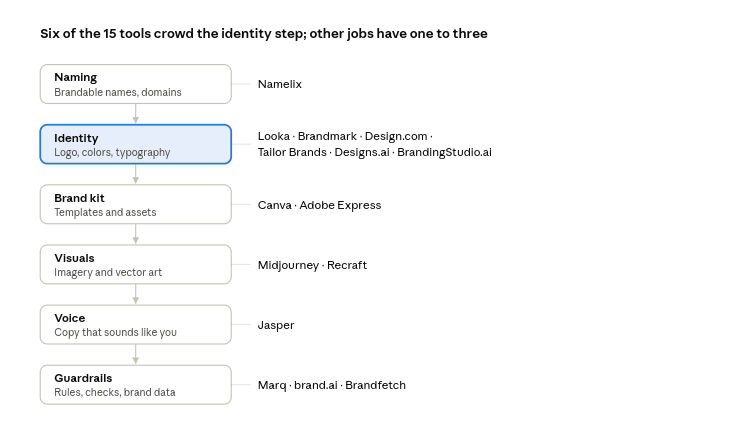
Identity is the crowded step, so test two tools there and add one tool per remaining job only when you need it.
How we evaluated these tools
We compared tools on six criteria, weighted toward what founders and small teams actually need:
- Coverage: which brand jobs does it handle, and how deeply?
- Output quality and control: can you edit and refine, or only accept what you’re given?
- Ownership and licensing: what are you allowed to do with the result commercially?
- Consistency features: does it lock colors, fonts, styles or voice?
- Price clarity: what do you pay on day one and over a year?
- Ease of use: can a non-designer finish without help?
This guide draws on vendor pages, independent price trackers and published reviews. It doesn’t invent star ratings, because a made-up score only looks scientific. The most reliable test is your own: run the same brand brief through your top two tools and compare.
The 15 best AI branding tools in 2026
1. Namelix: best for AI business names
Best for: Founders who need a name before anything else.
Namelix generates short, brandable names from a few keywords and a style choice, then shows .com availability and a logo preview beside each name. Name generation is free. Commercial logo files go through Brandmark, its parent company’s logo service. Namelix does not check trademarks, so search your national database before you commit.
Strengths: Free, fast, domain check built in, learns from the names you save.
Limitations: Invented names can be hard to spell or say aloud, and there’s no trademark clearance.
Verdict: The best free first step. Treat it as an idea engine, then vet your favorites.
2. Looka: best for a guided logo and brand kit
Best for: People who want to be walked through a full identity.
Looka generates logo options from your name, industry and style choices, then builds a brand kit with colors, fonts, templates and social assets. Pricing moved in 2026: price trackers reported a rise in its one-time packages in September, to about $35 (Basic) and $72 (Premium), with the Brand Kit subscription at about $96 a year. Confirm current prices before buying.
Strengths: Polished guided flow, large option set, brand kit and website tools.
Limitations: No permanent free download, and reviewers often mention confusion about one-time versus subscription pricing.
Verdict: Our default pick for a new business that will actually use the kit.
3. Brandmark: best pay-once identity
Best for: Wordmarks and lettermarks, and anyone who dislikes subscriptions.
Brandmark sells one-time packages, commonly listed at $25, $65 and $175. One comparison reports that the $65 Designer package adds source files, a brand style guide, business card designs and app icons. Reviewers praise its typography and note fewer starting concepts than some rivals. It reportedly added a chat-style interface in 2026.
Strengths: Pay once, clean type-driven results, pairs with Namelix.
Limitations: Weaker for illustrated or playful brands.
Verdict: Best when your brand is mostly your name, set well.
4. Design.com: best free-tier start with matching assets
Best for: Budget-minded founders who want a logo plus matching business assets.
Design.com pairs an AI logo generator with a large template library and chat-style editing. The company says its free tier includes a logo download plus a basic website, link-in-bio page and digital business card, and paid plans start around $3 a month on annual billing. Treat template counts and rankings on its own blog as marketing claims and test the output yourself.
Strengths: Low entry price, vector exports, 50+ branding tools that reuse your logo colors.
Limitations: Less fine control than design software, and AI use on the free tier can be capped.
Verdict: A strong low-cost all-in-one, worth testing against Looka and Brandmark.
5. Tailor Brands: best for launching a business and brand together
Best for: Solo founders who want branding and business setup in one subscription.
Tailor Brands positions itself as a business-in-a-box platform. Comparison sites list prices from roughly $4 a month on annual billing to about $10 to $50 a month on monthly plans, with LLC-formation bundles around $200 a year. Value depends on whether you’ll use the extras.
Strengths: Logo, digital business card and launch services together.
Limitations: Subscription only, and pricier than logo-first tools if you only need a logo.
Verdict: Convenient for launch week, less compelling as a pure branding tool.
6. Designs.ai: best for logo plus video and social assets
Best for: Small teams that want one suite for several creative jobs.
Designs.ai bundles a logo maker with video, copywriting and social media tools. Comparison sites quote entry plans between roughly $19 and $29 a month, so check the current price. Because the logo maker is one module in a larger suite, it makes most sense if you’ll use the other modules.
Strengths: Broad toolset under one login.
Limitations: Logo depth is narrower than dedicated logo tools.
Verdict: Choose it for breadth, not for the best logo.
7. BrandingStudio.ai: best for a strategy-led brand identity
Best for: Startups and small agencies that want strategy before visuals.
BrandingStudio.ai describes itself as a platform that generates brand strategy, voice, visual identity and guidelines in about 50 to 70 minutes across seven modules. Directory listings mention vector SVG files, a live brand hub, a guidelines PDF and a 90-day launch roadmap. Its own blog lists a free start and a one-time option around $237.
Strengths: Strategy, voice and visuals in one workflow.
Limitations: Most descriptions come from the vendor and directories, so try the free start before paying.
Verdict: Worth a look if you want positioning and guidelines, not just a logo.
8. Canva: best for everyday branded content
Best for: Teams that make social posts, slides and documents every week.
Canva has a generous free plan and a Pro plan of roughly $13 to $15 a month, which unlocks brand kits and SVG export. Its AI features include text-to-image generation, background removal and magic resize. The catch is that its logo templates aren’t exclusive, so your logo may resemble others.
Strengths: Huge template library, easy to learn, strong free tier.
Limitations: Less distinctive logos, and weaker brand governance than dedicated platforms.
Verdict: The best place to produce branded content, even if the logo comes from elsewhere.
9. Adobe Express: best for Adobe users
Best for: Designers and teams already on Creative Cloud.
Adobe Express has a free plan and a Premium plan at $9.99 a month or $99.99 a year. It uses Adobe Firefly for AI editing, and Creative Cloud Libraries can sync brand assets. Marq’s own comparison, a competitor source, says it lacks locked fields and approval workflows.
Strengths: Strong vector tooling, Adobe Fonts, Creative Cloud sync.
Limitations: Thinner logo-specific AI and a steeper learning curve for newcomers.
Verdict: Best when branding is part of a bigger Adobe workflow.
10. Midjourney: best for original brand imagery
Best for: Campaign visuals, mood boards and hero images with a distinctive look.
Midjourney has four plans: Basic at $10 a month, Standard at $30, Pro at $60 and Mega at $120, with 20% off annual billing and no free tier. Stealth mode, which keeps your images out of the public gallery, is reported to be Pro and Mega only. Companies above roughly $1 million in revenue are reported to need Pro or Mega for commercial rights, so read the current terms.
Strengths: Strong image quality and style range.
Limitations: Raster output, privacy depends on the plan, and it isn’t reliable for logos with precise text.
Verdict: The best pick for imagery, not for logos or guidelines.
11. Recraft: best for vector art in a consistent style
Best for: Designers and founders who need editable SVG graphics and a locked brand look.
Recraft is built around native vector output and lets you train custom brand styles from reference images. It has a free tier, and paid plans are reported at roughly $10 to $25 a month depending on the source. Reviewers note its vector export suits flat styles best.
Strengths: True SVG output, style consistency across assets.
Limitations: A design tool, not a guided branding flow, so it suits people comfortable with prompts.
Verdict: The best AI option when you need scalable graphics that match a set style.
12. Jasper: best for consistent brand voice
Best for: Marketers who publish a lot and need every piece to sound like one brand.
Jasper’s core feature is Brand Voice, which you train on your existing content. It has no permanent free tier, and 2026 reviews report plans from roughly $39 to $69 per seat per month with custom Business pricing and caps on the number of voices on lower plans. Confirm current plans on its site.
Strengths: Deep brand voice controls, team workflows.
Limitations: Expensive for solo users, and voice caps push multi-brand teams into custom pricing.
Verdict: Worth it for volume and teams; a general AI assistant may be enough otherwise.
13. Marq: best for keeping teams on-brand
Best for: Distributed teams that need locked templates and approvals.
Marq describes itself as built for enterprise governance, with locked templates, role-based controls and a Brand Guardian that checks designs against your rules in real time. That description comes from Marq’s own blog, so treat it as a vendor claim and ask for a demo.
Strengths: Governance controls that general design tools lack.
Limitations: Overkill for a solo founder, and pricing isn’t clearly published.
Verdict: A fit once more than a handful of people create brand assets.
14. brand.ai: best for enterprise brand intelligence
Best for: Large organizations that want AI assistants to follow brand rules automatically.
brand.ai calls itself a “Brand OS” that turns existing guidelines into machine-readable rules, so teams, partners and AI tools produce on-brand assets. It is quote-based and aimed at enterprises.
Strengths: Brand rules usable by both people and AI.
Limitations: Not for small budgets, and it manages a brand rather than creating one.
Verdict: Relevant when brand consistency becomes an operational problem.
15. Brandfetch: best for brand data and assets
Best for: Developers and marketers who need other companies’ logos, colors and fonts programmatically.
Brandfetch is a brand-data service. Its Brand API returns logos, colors and fonts for tens of millions of brands, and a separate Brand Context API covers mission, positioning and voice. Its pricing page lists a free plan with 100 fetches and a paid tier at $129 a month for 2,500 fetches, though some directories still show older prices.
Strengths: Clean, structured brand data, free logo access.
Limitations: It doesn’t create your brand, and logo use is subject to fair-use rules.
Verdict: Niche, but useful for product teams and competitive brand research.
Which tools do you actually need? Three stacks
| Stage | Suggested stack | Cost note |
|---|---|---|
| Just starting, near-zero budget | Namelix, Design.com free tier, Canva free | Mostly free; check which exports the free tiers include |
| Launched and building momentum | Looka or Brandmark for identity, Canva Pro, Midjourney or Recraft for visuals | A one-time logo purchase plus a few small subscriptions |
| Growing team or several brands | Jasper for voice, Marq or brand.ai for governance | Governance tools are usually quote-based |
How to build a consistent AI-assisted brand in 7 steps
- Write a one-paragraph brief: who you serve, what you promise and three adjectives for your style.
- Pick a name and vet it: shortlist with Namelix, then check the domain and search trademarks.
- Generate your identity: test two tools with the same brief and keep the clearer logo.
- Lock the basics: record your hex colors, font names and logo variants in one place.
- Train your voice: give a voice tool real samples of your best writing, not generic descriptions.
- Reuse the same style references: use one reference image or style set for every visual you generate.
- Write it down: save a one-page guideline so every tool, freelancer and AI assistant follows the same rules.
Is AI branding legally safe? Ownership, copyright and trademarks
Copyright is limited for purely AI-made work. In the United States, the Copyright Office has taken the position that material generated by AI without enough human authorship generally can’t be registered. Customize and edit what you generate. Rules differ by country, and this isn’t legal advice.
Trademark is a separate question. Search your national trademark database and the web for lookalike names and logos. A platform’s originality check is not a trademark clearance.
Read the license. Terms differ on commercial use, exclusivity and public visibility, as Midjourney’s plan rules show. .
Mind your data. Check what a tool does with the brand documents and samples you upload before using confidential material.
Common mistakes to avoid
- Buying a tool for one job and expecting it to do all six.
- Using different styles, prompts and fonts in every tool, which erodes consistency.
- Skipping trademark and domain checks on an AI-generated name.
- Paying for annual plans before testing the free tier or a one-month plan.
- Treating AI output as finished instead of editing it to fit your brand.
Frequently asked questions
What is the best AI branding tool?
For most new businesses, Looka, because it combines a logo with a brand kit in one flow. For naming, use Namelix. For visuals, use Midjourney or Recraft. For voice, use Jasper.
Are there free AI branding tools?
Yes. Namelix is free for names, Design.com and Canva have free tiers, Recraft has a free tier and Brandfetch has a free plan. Free plans often limit exports, AI usage or commercial terms, so check each one.
Can AI build a complete brand?
AI can draft a name, logo, kit, visuals and voice quickly, and tools like BrandingStudio.ai aim to cover strategy too. You still need human judgment on positioning, consistency and legal checks.
How much does AI branding cost compared with an agency?
A starter AI stack can cost little or nothing, and a paid one often runs from tens to a few hundred dollars. Commonly cited ranges are $800 to $3,500 for a freelance designer and $5,000 to $50,000 for an agency.
Do I own what AI branding tools create?
It depends on the tool’s license and your country’s law. Read the commercial terms, and remember that purely AI-generated artwork may have limited copyright protection.
How do I keep my brand consistent across AI tools?
Use a written guideline, the same color codes and fonts everywhere, one style reference for images and a trained brand voice. Consider a governance tool once a team is involved.
What’s the difference between an AI logo maker and an AI branding tool?
A logo maker produces a mark and sometimes a small kit. A branding tool covers a wider job, such as naming, visuals, voice or guidelines. Our AI logo maker comparison covers the first group.
How long does AI branding take?
A first draft of a name, logo and kit can take under an hour. Refining it and testing it with real customers takes longer and is worth the time.
Final verdict
Start with Namelix for a name, then test Looka and Brandmark on the same brief. Add Canva for everyday content, Midjourney or Recraft when you need original visuals, and Jasper if voice consistency matters. Reach for Marq or brand.ai only when a team makes consistency hard.
Whatever you choose, write your guidelines down, check trademarks, and edit the output until it feels like yours.